
Skip table of contents

MYOB AE/AO release notes — 5.4.57/2025.2 SP2 (Australia)

Release date—March 2026

What's included in the release

SQL 2025 certification for AE/AO

MYOB AE/AO is now compatible with SQL 2025.

You must install this version (5.4.57) if you want to upgrade your database to SQL 2025.

Tax

2026 Fringe Benefit Tax returns has moved to Practice Compliance

2026 FBT returns have moved to MYOB Practice Compliance and can no longer be created or lodged from AE/AO.

You can start lodging FBT returns in Practice Compliance from 1 April 2026.

Learn how to create and lodge FBT returns in Practice Compliance.

You can create, lodge or amend FBT returns prior to 2026 in AE/AO


Bug fixes

Lodgement Manager homepage date range shows only up to 31/12/2025

You may notice that the date range on the Lodgement Manager homepage shows only up to 31/12/2025. The date field options do not have the 2026 year. This is now fixed.

Company return

  • In a Trust income schedule, if the Trust type is either P(Public unit trust (listed) - other than a cash management unit trust or CCIV sub-fund trust) or Q(Public unit trust (unlisted) - other than a cash management unit), the amount will now integrate correctly to Item 6 Label H - Total Dividends on the main return.

Individual return

  • ETP calculation: If the ETP payment type is O (Non-excluded payment - golden h’shake, gratuity) or P (Non-excluded payment over multiple income years), the calculation was incorrect. This is now fixed.

PLS errors

  • CMN.ATO.IDS.440701: Tax return with an International Dealings schedule was incorrectly rejected by the ATO. This is now fixed.

  • CMN.ATO.IITR.730412: This rejection happens on an individual tax return, and if you’ve installed the 5.4.56/2025.1 SP1 release

Client Accounting

AccountRight v19 End Of Life

MYOB AccountRight Classic v19 is discontinued from 28 February 2026.

You can no longer configure AccountRight v19 ledger in Client Accounting.
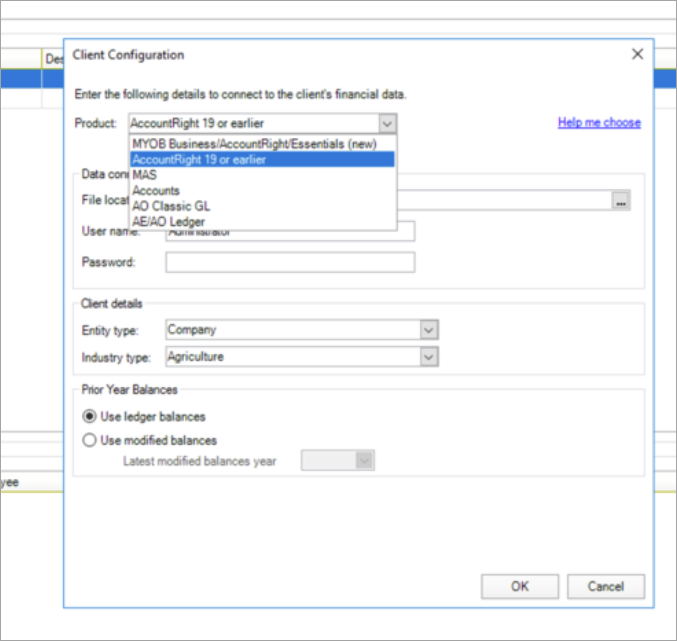
AR-EOL.png

Bug fixes

  • Error: Could not load workpapers. Reason : Plugin Loader exception. Some plugins are failed to load, plase check .. . This error occurred when you click the Maintain Control Group (within Assets) window. This is now fixed.

  • Error: MYOB Assets Common. Helpers. InvalidResponseCodeException Not Found. This error occurred when deleting a client. This is now fixed.

Assets in Practice Compliance
  • Adding an asset: If you’re using Assets in Practice Compliance for the first time, we’ve added a bit more guidance to help you set up your asset register before adding an asset. The workflow remains the same, and assets still require an asset class to be created first.

Bug fixes

  • Updating Pool OWDV in the assets register in Practice Compliance
    You can now update the Opening Written Down Value (OWDV) for the Small Business pool and Low Value pool in the Assets register in Practice Compliance. When you update the value, make sure it is not negative.

    Depreciation and the Closing Written Down Value (CWDV) of the pool will be recalculated to include the adjustment, and the updated values will flow through to the following schedules:

    • Small business pool and Low value pool schedules

    • Tax schedule

    • Full schedule

    • Statutory reporter

  • Previously, if you had adjusted the pool OWDV in the depreciation worksheet in AE/AO, that adjusted value would not appear in the Assets register after migrating to Practice Compliance. Now the OWDV field in the asset register allows you to enter the correct amount based on your tax data.

  • Adjusting negative pool balance: If an asset in the pool is sold for more than the value of the pool and the pool balance is negative, you can update the pool value to offset the negative amount.

Practice Manager and Job Manager

Practice Manager

Accountants Office only

You can add your new accounting year and periods before the start of the new financial year in Accountants Office. This lets you enter your timesheets and bills for the new financial year.

You can add only one year from the current year.

Job Manager

You can now add an accounting year for a client using the Job Sheet homepage in Accountants Office.

You can add up to 3 years from the current year.

JavaScript errors detected

Please note, these errors can depend on your browser setup.

If this problem persists, please contact our support.