
Practice Manager only
Before you change the hourly rate for an employee, you should first enter an End Date for the old rate. You can then enter a new hourly rate and a new start date. This maintains a record of previous rates for the employee.
You can only have one open instance of each charge rate type at one time (i.e., only one standard rate or premium rate per employee). A warning message is displayed if you try to add the same Charge Rate Type twice.
(AE) If you have current duplicate charge rates, reports and timesheets may be affected.
You should also ensure that:
-
the employee has posted all their timesheets, and
-
the change is made at the end of a period.
Any timesheets entered before the charge rate is changed will not use the new rate, so it is important to set up new rates in advance.
To edit an employee’s hourly charge rate where the rate was entered incorrectly
-
In the toolbar, click Contacts drop-down and choose Employees. The Find Employees tab appears.
-
In the Search for field, type the employee code or name and click Search. The Employee record appears.
-
Double-click the employee name to open the record. The Employee page opens.
-
Click the Charge Rates tab. The Charge Rates tab appears.
-
Edit the Start Date entry as required. Use the format dd/mm/yyyy or select a different date from the drop-down calendar.
-
Edit the End Date entry as required. Use the format dd/mm/yyyy or select a different date from the drop-down calendar.
-
Change the Charge Rate Type entry as required.
-
Change the employee’s Hourly Rate to the correct hourly charge rate.

-
Enter any extra information about the employee’s charge rates in the (AE) Notes section/(AO) Charge Rates Notes section. The usual note formatting options are available.
-
Click OK to save and close the Employee page.
If a charge rate was entered with an incorrect hourly rate, you can:
-
correct each timesheet line and re-select the charge rate or
-
re-enter the number of units, providing the timesheet entry hasn't been billed.
-
To enter a new employee charge rate where their rate has changed
-
In the toolbar, click Contacts drop-down and choose Employees. The Find Employees tab appears.
-
In the Search for field, enter the employee code or name and click Search. The Employee record appears.
-
Double-click the employee name to open the record. The Employee page opens.
-
Click the Charge Rates tab. The Charge Rates tab appears.
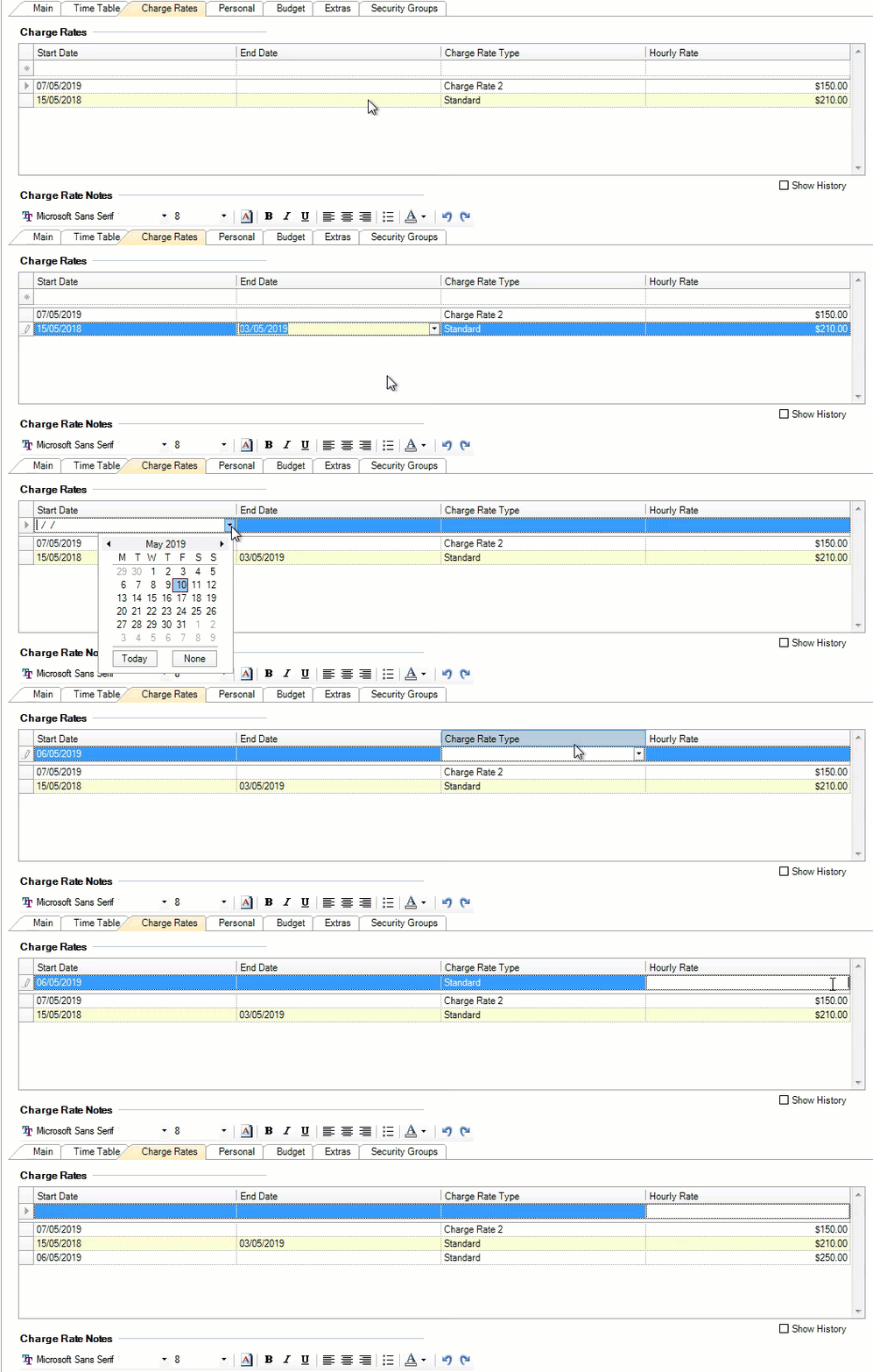
-
Enter the end date for the rate into the End Date field of the relevant charge rate type and press Tab. The cursor moves to the Charge Rate Type field.
Alternatively, click the drop-down to select the date from the calendar.
-
Click in the Start Date field on the new record row, type the Start Date for the new rate and press Tab twice. The cursor moves to the Charge Rate Type field.
-
From the drop-down, select the rate type and press Tab. The cursor moves to the Hourly Rate field.
-
Type the new $ hourly rate and click OK.
If a charge rate was entered after timesheet entries have already been saved/posted, you can:
-
correct each timesheet line and re-select the charge rate or
-
re-enter the number of units, providing the timesheet entry hasn't been billed.
-