
The Spouse Details dialog contains all the information relating to the spouse needed to calculate a correct estimate of tax payable/refund due.
Spouse Date of Birth, Name and Gender
If you have completed the spouse’s return in your Tax Ledger, you can import all the Spouse details necessary to complete your return by clicking F10 at the Spouse Date of Birth field in your return. See Spouse details 2023.
If subsequently you alter any values in the spouse’s return, you'll need to refresh the spouse’s details in the taxpayer’s return by again using the F10 Fetch spouse details functionality.
Spouse dialog
To open the Spouse dialog click the Schedule Icon or press Alt+S at any label L to F. Other access points to the Spouse dialog are provided when you're completing:
-
-
Senior and pensioner tax offset at T1
-
Invalid spouse or carer offset at T6
-
(AE and Series 6 & 8) The Calculation Profile in the What-if calculator
-
When completed we'll pass these details to labels L, M and N in the main return.
To complete the spouse dialog - Details
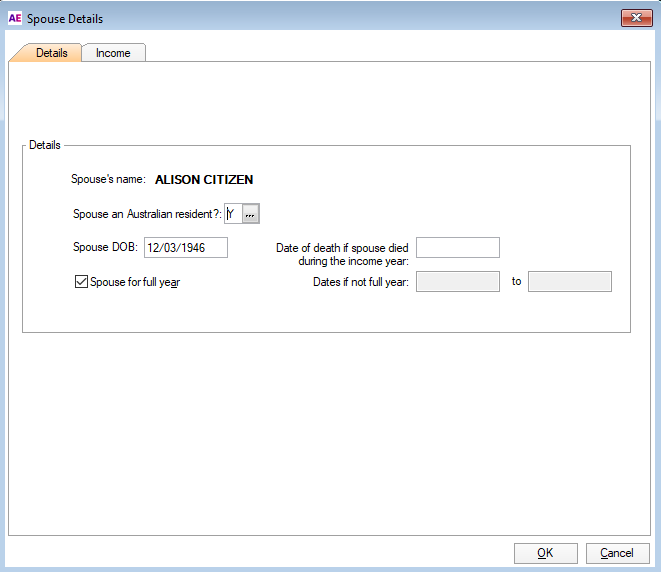
Spouse an Australian resident?
The residency status of the spouse is needed for the calculation of some dependency offsets and for those situations where the taxpayer is a non-resident in receipt of an:
-
Australian Government allowance–item 5 and/or
-
Australian Government pension or allowance–item 6.
Spouse DOB
Once entered, this date rolls over from year to year.
Married to taxpayer for full year
Select this checkbox to indicate that the taxpayer was married or in a de facto relationship for the whole of the income year.
If the spouse died during the income year, although you're considered to have had a spouse for the whole of the income year, uyou must enter the date of death.
We use this when pro-rating the spouse’s income for Combined Adjusted Taxable Income (CATI) purposes.
Dates married if not for full year
Enter the dates in the current income year you had a spouse.
If you had more than one spouse, enter the From-To dates for the one who was your spouse at 30 June of the current income year.
To complete the spouse's income labels
Spouse income reviewed checkbox
It's an ATO requirement for PLS lodgment that you complete all spouse income labels.
If there is no amount, then enter a zero. Select the Spouse income reviewed checkbox and we'll populate the zeroes for you.
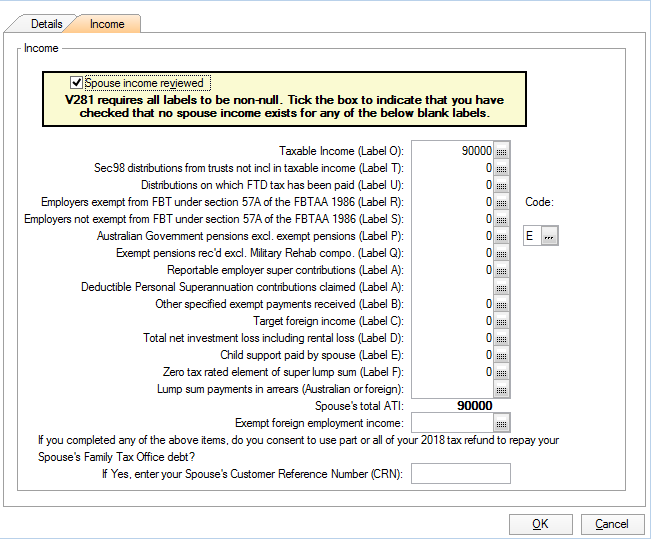
Label O - Your spouse's current year taxable income
-
The amount entered here should be the spouse's total net taxable income.
Label T - Your spouse's share of trust income on which the trustee is assessed under section 98, and which has not been included in your spouse's taxable income
-
A Trustee is assessed under section 98 of the ITAA 1936 in relation to a presently entitled beneficiary under a legal disability.
-
If that applies to your spouse and isn't included in the spouse’s taxable income, then enter that amount at label T.
Label U - Distributions to your spouse on which family trust distribution tax has been paid which your spouse would have had to show as assessable inc. if the tax had not been paid
Enter the amount of any distributions to the spouse on which:
-
family distribution tax (FDT) has been paid. and
-
the spouse would need to include as assessable income if the FDT had not been paid.
Your spouse's total reportable fringe benefits amount.
This is not an ATO field. We require it for the correct calculation of ATI for rebate purposes.
Label R - Employer's exempt from FBT under section 57A of the ITAA 1986
-
This is the amount at Item IT1, label N in the spouse's return.
Label S - Employer's not exempt from FBT under section 57A of the ITAA 1986
-
This is the amount at Item IT1, label W in the spouse's return.
Label P - Amount of Australian Government pensions and allowances (see Q6 Australian Government pensions and allowances in the instructions) that your spouse received in the current income year (exclude exempt pension income)
-
If your spouse received an Australian Government pension at item 6 in their return, select the applicable pension code from the list provided at the code box beside label P.
Do NOT select a Pension code if the spouse was not in receipt of an Australian Government Pension or Allowance at item 6 in the spouse’s return.
Include Exempt pensions at labels Q and B.
Label Q - Amount of exempt pension income (see Spouse details - married or de facto in the instructions) that your spouse received in the current income year. Do not include any amount paid under the Military Rehabilitation and Compensation Act 2004
-
If the spouse received any exempt pension income, enter that amount. See Amounts that you do not pay tax on on the ATO website for full details of those exemptions.
Label A - Amount of your spouse's reportable superannuation contributions
-
This is the total of reportable employer superannuation contributions and deductible personal super contributions.
-
It is the amount at IT2: label T in the spouse's return.
Label B - Your spouse's amount of any tax-free government pension paid under the Military Rehabilitation and Compensation Act 2004 that have not been included at label Q above.
-
It is the amount at IT3: label U in the spouse's return.
Label C - Your spouse's target foreign income
-
Target foreign income is any foreign income earned or received by the taxpayer that is not included in assessable income; for example, exempt foreign income and regular gifts of money from a foreign source, or foreign source moneys won in a promotion.
-
It is the amount at IT4 label V in the spouse's return.
Label D - Your spouse's total net investment loss:
-
This is the amount by which your spouse's financial investment deductions exceed their financial investment income plus the amount that their rental property deductions exceed their rental property income.
-
It is the amount included at IT5: label X plus the amount at IT6: label Y in the spouse's return
Label E - Child support your spouse paid
-
Include the total amount of child support payments or benefits your spouse provided to another person for the maintenance and care of your child or children. Do not count any payments or benefits provided to you by your spouse unless you live apart on a permanent or indefinite basis.
-
This is the amount at IT7: label Z in the spouse's return.
Spouse's total ATI
-
This is an ATO off return field and must be calculated and lodged via PLS.
-
It is the sum of the income fields, labels O to E in this dialog. It does not include label F's superannuation lump sum amount.
-
It's important to complete are labels relevant to your spouse as these directly affect your eligibility to receive certain offsets and other credits.
Exempt foreign employment income
This is NOT an ATO field. We need it for calculation purposes. This amount is passed from the SD to the M2 Income details box to be used when calculating combined income for some offset purposes.
Customer Reference Number (CRN) – Back page of Individual return
If you completed any of the above labels do you consent to use all or part of your tax refund to repay your Spouse’s Family ATO debt?
-
If Yes, enter your Spouse’s Customer Reference Number (CRN)
-
The CRN number will be printed when the return is printed.