This support note applies to:
• AE Workpapers (AU)
• AO Workpapers (AU)
• Workpapers (NZ)
In MYOB AE/AO Client Accounting tab, you may see the following error System.ApplicationException. Error retrieving company file:
The version of AccountRight required to service this request is not installed. Please inform
your Administrator to install all required versions.
When trying to access the client accounting workpapers tab.
This error occurs if the required version of AccountRight is not installed.
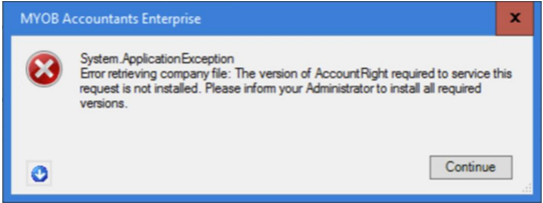
If you click Continue, the workpapers screen might be blank.
To fix the error,
-
Run the SQL script to remove the link between AccountRight and Client Accounting
-
Make sure you’ve installed the latest version of AccountRight Server Edition (AR SE) on the workstation
Running the SQL script
Before fixing the error, remove the configuration link between the file and Client Accounting. You can do this by running an SQL script on the affected workstation for the client you’re trying to access workpapers.
To run a SQL script, see How to run the CA Config. SQL Script in MYOB AE/AO.
Install the latest AccountRight Server Edition (AR SE)
Make sure that the latest AccountRight Server Edition (AR SE) version is installed on the workstation.
Still having an issue?
If the issue is still not resolved, then uninstall all the previous versions of AccountRight and install the latest AccountRight Server Edition version.
Check the current version of AccoutRight
-
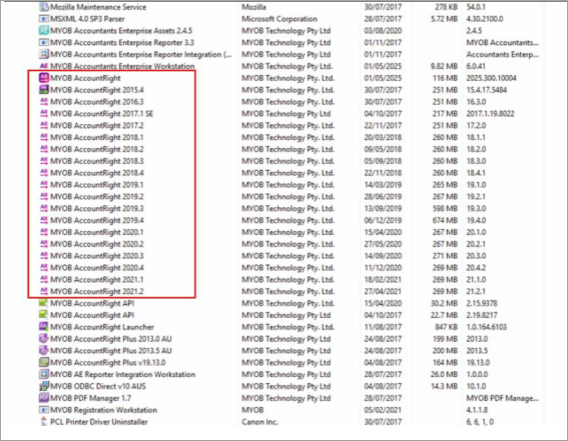
Go to the Start menu > Control Panel > Programs and Features > MYOB AccountRight versions
-
Right-click MYOB AccountRight (older versions) and select Uninstall.
-
Follow the prompts to uninstall it.
-
Repeat for all other previous versions of AccountRight Server that are installed.
-
Right-click MYOB AccountRight API, choose Uninstall and follow the prompts.
A new MYOB AccountRight API will be installed when you install the new AccountRight Server
Edition. -
Repeat these steps on each workstation that has AccountRight Server Edition installed.
Install the latest AccountRight Server Edition
-
Close out of all MYOB applications.
-
Right-click latest version of AccountRight Server Edition and select Save target as to download the file file to your desktop.
-
Double-click the downloaded installer file to start the installation.
-
Follow the prompts to install it.
-
After installing, you'll see a new AccountRight Server Edition icon on your desktop