
What's new in Client Accounting in MYOB Practice
This page lists new features and improvements in Client Accounting.
April 2026
Updated data sync
We’ve updated the ways you set up data sync in Client Accounting.
More account codes and names to help with mapping
We’ve added 10 new account codes and updated 4 account names in Client Accounting so you can easily map accounts from different ledgers and CSV file uploads to the Client Accounting chart.
New account codes
Account code | Name | Type |
|---|---|---|
8.00850 | Profit on sale of assets | income |
6.01085 | Filing fees | expense |
6.01086 | Franchising expenses | expense |
6.01106 | Management fees | expense |
6.04009 | Health and safety costs | expense |
6.09013 | Hire expenses | expense |
6.04015 | Workers compensation | expense |
6.09015 | Loss on sale of assets | expense |
2.12024 | Superannuation payable | liability |
2.12025 | PAYG withholding | liability |
Account code name updates
Account Code | Old Name | New name | Type |
|---|---|---|---|
8.00800 | Government subsidies | Government grants and subsidies | income |
1.25100 | Term debtors | Trade debtors | asset |
2.12010 | Trade payables | Trade creditors | liability |
2.21100 | Trade payables | Trade creditors | liability |
March 2026
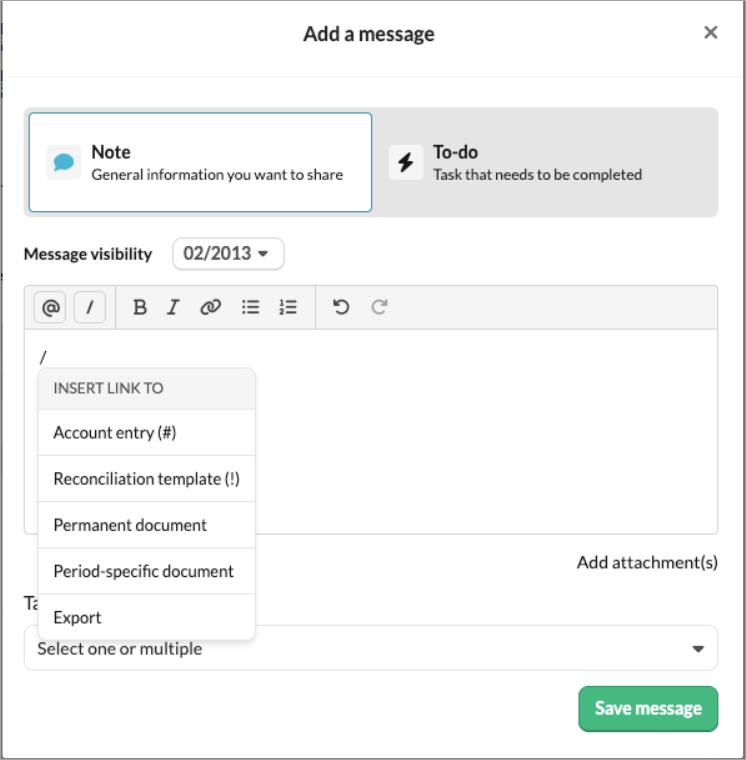
Insert existing content in Notes and To-dos using a shortcut
You can now insert existing content, such as reconciliation templates, to account entries, documents, and exports using the shortcut icon.
Use ⵌ for quick access to account entry links
Use ! for quick access to reconciliation template links
See the review status of workpapers
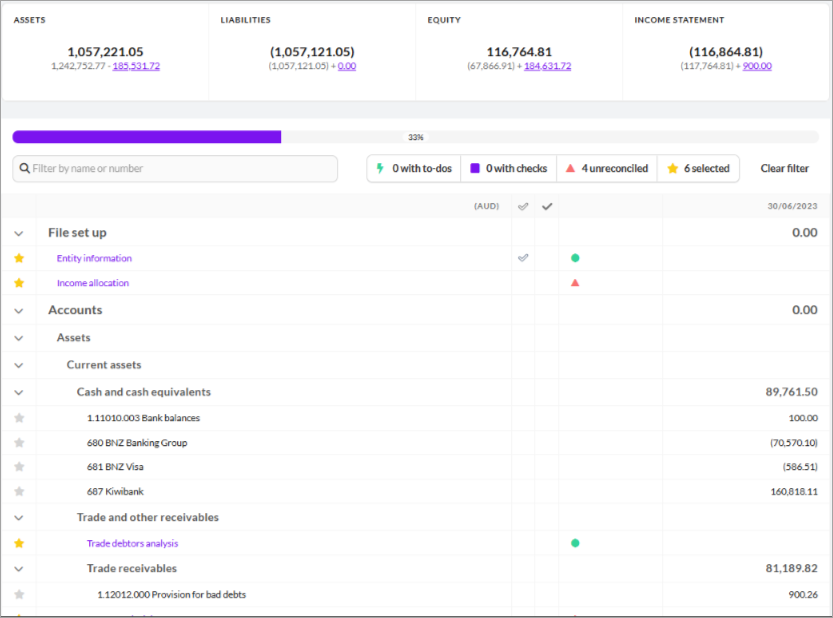
We’ve added a visual indicator column in the workpapers to show whether it has been reviewed.
The indicator that shows the template has been reviewed is no longer part of the row of existing icons.
A dedicated column displays the review icon. If a template hasn’t been reviewed, the column will be empty.
The icon contains the number of reviewers, and hovering over the icon shows a tooltip providing details about the review status.
Inventories Summary reconciliation workpaper
We’ve released Inventories Summary reconciliation workpaper that summarises the inventory type and the accounts it is linked to from multiple inventories account workpapers.
December 2025
Fines and Penalties workpaper
We’ve released the Fines and Penalities workpaper that works similarly to a Non-deductible expenses workpaper and automatically defaults non-deductible expenses to 100%.
Non-deductible expense workpaper
Companies and trust
We’ve released the Non-deductible expense workpaper to automatically track the non-deductible expenses for income tax reconciliation. You can enter the amount as a percentage or dollar amounts, and it automatically calculates the deductible vs non-deductible portions. This workpaper also includes optional GST adjustment calculations, exports results for tax calculation integration, and ensures data integrity with period-specific storage.
Minor fixes
You can now choose to export stakeholder details with zero balance. These are not included by default, but you can select to include them in the export if needed.
We’ve updated the Stakeholders and Directors section in the Entity information workpaper, so only the first name is mandatory for Stakeholders.
We’ve reviewed and fixed some of the account pickers that were in the incorrect account ranges in the Income tax calculation workpaper.
We’ve added the following to the Other income account ranges:Add - Capital gains
Less - Non-assessable income
Less - Profit on disposal of tax exempt assets
Motor vehicle expense workpaper
We’ve released the motor vehicle expense workpaper, which lets you select accounts for line items and summarises all motor vehicle accounts used.
Minor fixes
We have updated the:
Wages reconciliation workpaper for Company & Trust entities. The non-deductible late payments will automatically flow through to the Income tax expense calculation workpaper.
Income tax expense calculation workpaper to include non-deductible expenses from the wages reconciliation and the Non-deductible expense workpaper.
November 2025
Bank loan summary workpaper
We’ve released the Bank loan summary workpaper that will show an overview of all bank loan liabilities from other bank loan workpapers. This will help you detect any variation with unrecocnciled indicators. You can click the loan names that link to the detailed workpapers. The workpaper only appears when the Bank Loan account template is used.
Wages reconciliation workpaper
We’ve released the wages reconciliation workpaper to include gross wages (W1) and PAYG withholding (W2) from the BAS Summary. Complete the BAS Summary first to populate W1/W2, then use the workpaper to reconcile against your payroll records and account balances.
Changes to the Entity information workpaper
We’ve made it simpler and easier to manage Stakeholder information in Client Accounting.
We’re adding a new Stakeholder section to the Entity Information workpaper. A central location for all your stakeholder information. Learn more
Other fixes
The Income tax expense calculation workpaper is now available for trust entities.
When exporting the Financial report, the footer will show the Firm name that is used on the Compilation report
We’ve changed the bank loan account workpaper, so you can now enter the loan details
Income tax payable or refundable workpaper
Companies only
We’ve released the Income tax payable or refundable template to help you verify the balance in the Income tax payable (liability) or Income tax refundable (asset) account in the balance sheet.
Some Account code changes
Added a new account number - 2.12040 Credit cards under 2.12000 Trade and other payables to help with tracking credit card obligations.
Updated the name of account 6.0101 to Accounting and bookkeeping fees to Accounting fees.
Added 2 new account codes under 6.01000 Administrative expenses:
6.01035 - Bookkeeping fees
6.01105 - Materials and consumables
Added account code - 6.0504 - Merchant card service fees under 6.05000 Finance costs
Minor fixes
We’ve updated the Trade and other payables note to include the non-current portion of loans to associates.
We’ve added a new account code under 2.10000 Current Liabilities to view the current and non-current breakdown of the lease liabilities.
2.15000 Lease liabilities
We’ve made changes to the account codes under 1.23000 Investment properties, so it is consistent with the other fixed account assets
1.23012 - Investment properties - accumulated depreciation
1.23013 - Investment properties - accumulated impairment
October 2025
Prepaid borrowing expenses workpaper
We’ve released the Prepaid borrowing expenses workpaper. This workpaper calculates the amortisation of borrowing expenses over a period of 5 years.
Bank loans and Dividend received workpapers
We’ve released 2 workpapers.
Bank loans
This workpaper reconciles bank loan liabilities and estimates current vs non-current balances based on repayment schedules. The current liability estimation calculator calculates the monthly interest and principal. You can make manual adjustments and confirm the total balance against the ledger.Dividends received
This workpaper reconciles the dividend income received during the financial year from different sources against the revenue account balance. Also record franking credits, withholding tax (TFN Tax), and gross‑up amounts to ensure accurate income tax reporting.
Intercompany loans, Franking Assets, Interest received and Term Deposit workpapers
We’ve released 4 new workpapers to help you with the calculations
Intercompany Loans
This workpaper checks inter-entity loans and other balances within a group to make sure they match. It compares what each entity records, highlights any differences, and flags balances that don’t net to zero so they can be investigated for errors.Franking Assets
Companies only
This workpaper tracks franking credits and debits throughout the year, providing a full audit trail and automatically rolling forward balances.Interest Received
This workpaper reconciles interest income and withholding tax, including the withholding tax percentage.Term Deposits
We’ve created this workpaper for account code 1.24050 Term Deposits. It reconciles ledger balances to bank statements and calculates accrued interest, with journal posting functionality.
Minor bug fixes
Income Tax accounting policy: The policy was always printing a policy number even when unstarred, causing numbering gaps. This is now fixed.
Borrowings note: We’ve updated the note so that non-current borrowings are considered when printing the note.
Income tax expense calculation workpaper: We’ve fixed the issue where a circular reference error was visible on the workpaper.
Income tax expense calculation workpaper
Companies only
We’ve released the income tax expense calculation workapaper to calculate taxable income by applying adjustments to Net profit/(loss) from the Income statement. You can attach this workpaper to the expense section.
We provide a fixed list of common items you can add to or subtract from Net profit/(loss). You can also add your own items at the end of each section, either from an account or type the amount in manually.
Based on the taxable income, calculate tax and record an adjustment journal.
Minor fixes
We’ve updated the Hire purchase workpaper to include future Adjustments in the reconciliation balance total.
We’ve updated the description of account code 1.19000 from Other current receivables to Other current assets in the Chart of Accounts.
September 2025
Logo improvements
Your logos will now print in high definition. You can insert logos into headers, footers on the main report pages and on cover pages.
Minor fixes
In the Hire purchase workpaper, the reconciliation balance total includes future adjustments.
Division 7A, Interest Expense and Summary of Hire Purchase templates
We’ve released 3 new workpapers to help you with your calculations.
Division 7A loan: Identifies and analyses loans or payments made to shareholders or associates that may be treated as unfranked dividends under Division 7A of the Income Tax Assessment Act.
Summary of hire purchase: Provides a consolidated view of all hire purchase agreements for the year, supporting asset and liability reconciliation.
Interest Expense: Details interest expenses incurred on loans and other borrowings, supporting deductibility and cash flow analysis.
Minor fixes
We have removed account code 1.26044 Software -movements account from the chart of accounts. If you have previously mapped an account here, you will need to remap it
August 2025
Accruals and Hire purchase templates
We’ve released 2 new account templates.
Accruals template: Use this template to record and allocate incurred but unpaid expenses or earned but unpaid income over their applicable periods. This will then accurately show the timing of expenses recorded and comply with accrual accounting principles in the Financial reports.
Hire Purchase template: Use this template to record and manage finance asset agreements by calculating the total finances, allocating monthly repayments between principal and interest using the effective interest rate method, and incorporating adjustments or a final payment. The liability can then be reconciled for the current and non-current portions if applicable.
Prepayment account workpaper
We’ve released a Prepayments account workpaper designed to support the reconciliation, allocation, and documentation of prepaid expenses across reporting periods.
GST fields in the standard account template
We’ve updated the standard account template to include a date column and GST calculations.
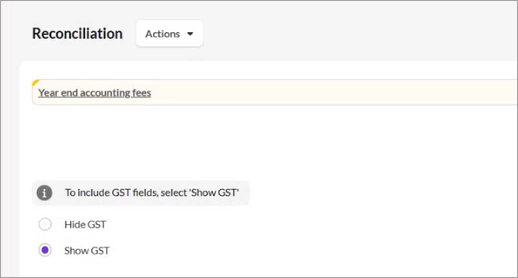
You can now import data into the reconciliation table. Refresh the page to show the correct column labels if Show GST is selected.
The description field is mandatory to ensure that reconciliation changes are adequately recorded.
The standard template will be defaulted to all account codes that don't have a specified account template (i.e. this will not show on bank accounts allocated to the 1.11010 account, as these will get the bank reconciliation workpaper)
Make sure you create a new export to include all account templates.
July 2025
Save your financial statements in MYOB Practice
You can send your financial statements in MYOB Practice so you can keep all your client’s documents in one place.
Exporting workpaper bundles
You can now export your workpapers to send to your client along with the Financial statements, or save for your audit purposes
Bank overdraft note
In the financial statements, there is now a bank overdraft to show the current and prior year comparatives.
We’ll show an amount if the mapped accounts with credit balances to either/or
a. Cash and cash equivalents range starting [1.11]
b. Bank overdraft [2.11]
The flip accounts workpaper will analyse the account ranges to determine which note the accounts are presented in.
Credit balances will be displayed in the Bank overdraft note and Debit balances will be displayed in the Cash and cash equivalents note.

The bank overdraft note should be starred to ensure:
note numbering to show on the balance sheet
to appear in the export
Trade creditors workpaper enhancement
We’ve heard your feedback and have updated the trade creditors workpaper to always show the trade creditors listing.
Minor fixes
We’ve corrected the spelling error in account names:
1.12042 Loans to related entities
1.25220 Loans to related entities
We've removed 9.53000 Change in reserves account from the chart so that you no longer have to record a change to a reserve in a separate account.
If you've mapped an account to this range previously, you will need to remap this account in the mapping window.
June 2025
Financial reporting is now available for key entity types in Client Accounting
Partnership
Trusts
Company
Individuals
Financial reporting for Partnerships and Sole traders
You can now create financial reports for partnerships and sole traders. We’ve updated the following workpapers:
Income Allocation workpaper (Partnerships only)
Income statement
Balance sheet
Introduction
Basis of preparation
Notes - Stakeholders' current accounts
Declaration
May 2025
New expense account for interest expenses
We’ve added a new expense account to our chart of accounts - 6.05030 Interest expense.
Now you can map interest expenses to this account, and they will be shown as a separate line item in the Income statement rather than included in the Borrowing expenses.
Font size on the cover page
We’ve heard your feedback that the client name on the cover page was too large, so we changed the default template to a smaller font size.
Updated note for Borrowings
We’ve created a note for Borrowings in the financial statements for all entities. This will help you identify the current and non-current borrowings of the entity.
April 2025
AI mapping is here!
Mapping your chart of accounts just got easier! Our AI tool saves you time by suggesting the accounts that match your client’s ledger, including multiple accounts that are a match. Learn more.
Financial reporting for Trust entities
You can create financial reports for Trust entities. We’ve updated the following to include trusts.
Entity information (is visible only when the entity is Trust)
Introduction paragraph
Basis of preparation paragraph
Income statement
Balance sheet
Notes to Stakeholders Current Accounts
New templates
In the Financial Statement workflow, we’ve added new templates:
Income allocation workpaper
Statement of changes in equity
New accounting policy note for Investment properties
New Notes for Investment properties and investments.