MYOB AE/AO release notes — 2026.0/5.4.58 (Australia)

Release date—June 2026

2026 Tax webinar

Register for a free MYOB tax webinar

Learn about the ATO's 2026 tax compliance changes in MYOB AE/AO, access the 2026 tax tables and new workflows in MYOB Practice Compliance.

2026 tax tables

The 2025–26 tax tables will be available soon.

Want to get them sooner? Join our 2026 Tax webinar.

What’s new in AE/AO

Rates changes
ATO pre-fill changes

To keep compliant with the ATO specifications, we’ve made changes to the ATO pre-fill data that is prefilled into the tax return and schedules.

From the end of August, you’ll not be able to pre-fill data from ATO for tax returns from 2017 to 2026 if you don’t update to 2026.0.

Prefill availability

The ATO has advised that pre-filled data will be available from 1 July, with most data finalised by the end of July.
Read more on the ATO’s website

  • More schedules with ATO pre-fill data: We’ve added more schedules that pre-fill data including Distributions from trusts (dit), New Tax payable schedule (tps).

  • ATO pre-fill data for Sole trader business information.

  • We’ve removed some pre-fill items as per the ATO specification

  • Trust income data for individual beneficiaries is available for pre-filling the 2026 individual return. This data will populate the Distribution received from trusts schedule.

  • Closing stock field: The amounts will now be pre-filled field with separate non-primary production closing stock and primary production closing stock.

Learn more about all these changes

Tax return changes

New Taxable payment schedule (tps)

We’ve created a new Tax payable (tps) schedule that will pre-fill TPAR and government grants data from the ATO.

See Taxable payments schedule

Individual return

Label changes

  • Early stage venture capital limited partnership (ESVCLP) and Early stage offsets (ESIC): ESVCLP and ESIC offsets can only be reported within the Distribution from Trusts and Distribution from Managed Funds schedules. You can no longer report them separately.

On 23rd June the ATO informed digital service providers that the fields were removed in error and will reinstated in late July.

We’ll make the changes in the software in the next release.

New picklist item

  • Other income: Taxable Payments and Other Third Party Reported Income

Deleted fields

  • Spouse details: Spouse gender is no longer required.

  • Deductions: D10 - Interest charged by the ATO option

  • Exploration credits (T9): You can no longer claim Exploration credits at Item T9 Other refundable tax offsets. Only the tax paid by the trustee as a refundable tax offset for the principal beneficiary of a Special Beneficiary Trust can be claimed.

Changes to Non-resident foreign income schedule

  • Updated the deduction median rate for relevant occupation codes

  • Added or deleted relevant occupation codes

Deductions schedule

In 2026, the ATO require the lodgment of the Deductions schedule to be in XML format rather than the previous XBRL format.

  • D4 Self education : Other circumstances has been removed as a valid Self education reason.

  • D10 Cost of Managing Tax Affairs : Interest charged by the ATO has been removed as a valid type code at D10

  • D15 Other deductions: The maximum number of records allowed to be sent to the ATO has been reduced from 100 to 20 set of records.

Multiple returns

Junior minerals exploration incentive is no longer available

Junior minerals exploration incentive (JMEI) no longer applies. For the 2025/26 income year onward, greenfields minerals explorers can’t create exploration credits, and cannot be reported. Based on that, the following fields have been removed from the tax returns

Return Type

Field

Trust

Item 54 Label G Other refundable tax offsets
Item 58 Label M Exploration credits distributed

Partnership

Item 54 Label M Share of exploration credits

Trust income schedule

Label M Exploration credits

Individual return - Income details

Dividends - Exploration credits for companies
Distribution from Trusts - Exploration credits
Distribution from Managed funds - Exploration credits

Fund

Item 12 Label E4

Self Managed Superannuation Fund

Item 13 Label E4

Reportable Tax position schedule

The Reportable Tax Position Schedule (rps) will now be available on Trust, and Fund tax returns.

Trust type updates

Trust types C (Special disability trust) and V (CCIV sub-fund trust) have been removed from the Trust Income schedule and in the main non-individual returns:

Return type

Field

Company return

Item 6 label G Gross distribution from trusts code field

Trust return

Item 8 Primary production and Non-primary production trust type

Partnership return

Item 8 Primary production and Non-primary production trust type

Company returns

Functional currency code updates

We’ve updated the picklist at item 8 label O Functional currency.

  • XCG - Caribbean Guilder is added

  • ANG - Netherlands Antillean Guilder is removed

Trust type updates

Label V - CCIV sub-fund trust has been removed from the type of trust picklist

Trust returns

New labels

Three new labels are added to the beneficiary section at item 58:

  • B1 Non PP managed investment scheme amount

  • U2 Franked distribution related to investment amount

  • H1 Other assable foreign source income from a financial investment amount

Update to labels

As a result of the new inclusion of the field at B1, NCMI labels have been re-labelled to B2 and B3 in the beneficiary section.

To strengthen data integrity, ATO have expanded data validations:

  • New mandatory fields for Individual beneficiaries with first name and date of birth now mandatory

  • Date of birth must not be entered for non-individual beneficiary

  • Assessment code must align with date of birth

  • Date of death required for no beneficiary assessment codes 15 and 16

Fund returns

New Reportable Tax position schedule

A new field was added at Item 19 Are you required to lodge a reportable tax position schedule?

  • Entering Y at Item 19 opens the Reportable tax position schedule

SMSF return

New Reportable Tax position schedule

A new field was added at Item 19 Are you required to lodge a reportable tax position schedule?

  • Entering Y at Item 19 opens the Reportable tax position schedule

There are some mandatory fields:

  • Item 12 Label H1: SMSF auditor fee - deduction

  • Item 12 Label H2: SMSF auditor fee - non deductible expenses” (Item 12 Label H2)

Some fields are renamed in the Member information schedule

  • Accumulation phase value (Label X1) renamed to Value of accumulation account

  • Retirement phase value (Label X2) renamed to Value of retirement account

Bug fixes

Company return

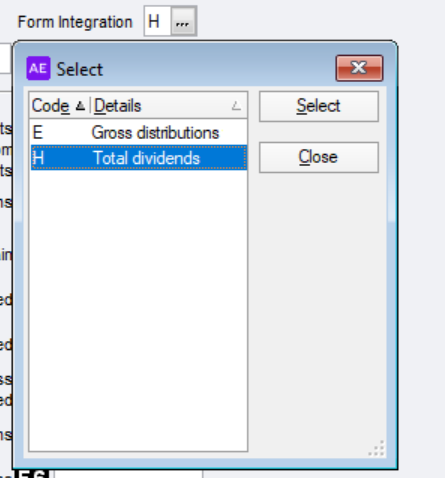
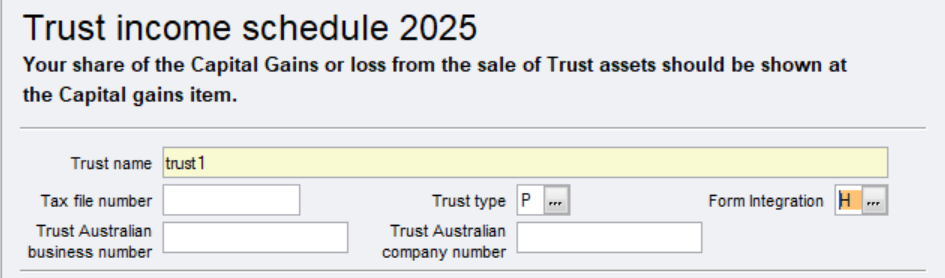
  • In a Trust income schedule, if the Trust type is either P(Public unit trust (listed) - other than a cash management unit trust or CCIV sub-fund trust) or Q(Public unit trust (unlisted) - other than a cash management unit), you can now choose one of the following the Form integration field:

  • Item 6E Gross distributions from trust

  • Item 6H Total dividends

Note that the Form integration field is only available if the Trust type is P or Q.
Form-integration-field.png
form-integration.png


Income Tax client report status

If you are on version 2025.1, in the Income tax client report the status code R (Returns not necessary) was not displaying.
This is now fixed and and we changed the status code to 3 (Returns not necessary) to be consistent with the rest of the status codes.

Client Accounting

Statutory reporter

SMSF only

We’ve updated the Measurement of Investments accounting policy as part of the compliance change:

  • revised wording for the opening paragraph

  • a new paragraph for unlisted investments

Trusts only

We’ve fixed a bug where a Trust is a Corporate trust with 1 director, the declaration report was printing as directors rather then director.

Practice Manager

Bug fixes

Budget Year drop-down shows only till 2025

Accountants office only

In the Budget tab of an employee record, you can select only up to 2025 year in the Budget Year. This is now fixed.

Note: For the Budget functionality to work properly, make sure you’ve added both accounting year and accounting periods, not just the accounting year.

Assets

Instant asset write-off limits for businesses with an aggregated turnover less than $10 million that apply the simplified depreciation rules threshold is updated to $20,000.

Need help?

We're here to support you through this busy tax season.

Extended support hours

25 June to 19 July 2026

Phone support

  • 9am to 5pm AEST (including Saturday and Sunday)

Live chat support

  • 9am to 7 pm AEST - Monday to Friday

  • 9am to 5pm AEST - Saturday and Sunday

Submit a support request

Check out our community forum