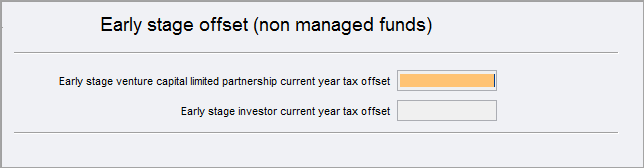
Early stage offset (non-managed funds) (ero) 2023

Complete the Early stage offset (non-managed funds) if you need to claim early stage tax offsets at :

ero.png

Accessing the ero worksheet

To open the ero worksheet:

  • Click Label K or M at item T7 Early stage venture capital limited partnership or Label L or O at item T8 Early stage investor.

  • Select Preparation > Schedule > Early stage offsets (non-managed fund).

  • Go to Preparation > Schedule > Income details schedule > Enter Y at Section T - Early stage offsets (non-managed fund).

You can use the ATO Pre-fill to download reports and check what the ATO has received from the investment or partnership. See What data pre-fills into Tax? 2023

Completing the ero worksheet
  1. Open the ero worksheet.

  2. To complete Item T7:

    1. Press enter at Early stage venture capital limited partnership current tax offset label. The Early stage venture capital limited partnership window opens.

    2. Select Worksheet to open the ESVCLP worksheet.

    3. Complete the investor details.

    4. Click OK to add another line or Click Close to close the worksheet.

    5. The offset amount displays in the Early stage venture capital limited partnership and Early stage offsets (non-managed fund) worksheets.

  3. To complete Item T8:

    1. Press enter at Early stage investor current year tax offset label. The Early stage investor window opens.

    2. Select Worksheet to open the ESIC worksheet.

    3. Complete the investment details.

    4. Click OK to add another line or Click Close to close the worksheet.

    5. The offset amount displays in the Early stage investor current year tax offset and Early stage offsets (non-managed fund) worksheets.

  4. T7 and T8 are prefilled with the offset amounts.