
This page outlines known issues and available workarounds for the 2026 tax year.
It’s regularly updated as new issues are identified and existing ones are resolved, helping you understand any impacts on your workflow and how to address them.
If you experience a problem not listed here, please contact support.
ATO known issues
|
Issue |
Description |
Fix |
|---|---|---|
|
VR.ATO.TRT.432289 Beneficiary's date of birth must be present
|
This is a ATO known issue where the Distribution statement has:
The return is rejected as it is expecting a date of birth for a non-individual entity. |
The ATO has provided the following workaround till they fix the issue. In the Distribution statement, select
Keep track of the issues on ATO troubleshooting page. |
|
CMN.ATO.PIITR.EM3001 The ATO was unable to confirm if your client has Statement of Distribution (SoD) prefill data, please check again later. |
This is a ATO known issue Individual return prefill receive a warning. |
ATO investigating the issue. |
MYOB known issues
|
Issue |
Description |
Fix |
|---|---|---|
|
ATO known issue CMN.ATO.PIITR.EM3001 - The ATO was unable to confirm if your client has Statement of Distribution (SoD) prefill data, please check again later. |
The ATO have a current issue they are investigating where all Individual return prefill receive a warning |
ATO investigating the issue. |
|
Company 2026 Business depreciation incorrect when there is a Second element cost |
The Second element cost is incorrectly added to the total business depreciation and integrates the incorrect amount at Item 6 label X |
We’re aware of this and looking into a solution. In the meantime, enter the amounts manually in item 6 label X. |
|
CMN.ATO.IITR.EM0075 Taxable payments adjustment reason must be provided. The amount of Taxable Payment income stated is less than the information the ATO has confidence in for your client. Please provide a reason for the Taxable Payment income not matching the ATO's prefill information. |
This ATO rejection appears even when a reason is not required as a mandatory field. |
We’re aware of this and looking into a solution. |
|
2026 Individual tax return Amount at TPS schedule is incorrect deducted from Business schedule income |
In a 2026 IITR with both a TPS schedule and Business schedule, the TPS amount may be incorrectly deducted from the Business schedule’s non-primary income at Item P8 label J. |
We’re aware of this issue and working on a solution. As a workaround,
|
|
Error : NO PDFs found to process using master file: C:\Users\XXXXXXX\XXX\XXX\FAX_TEMP\ELD\FAXELD.INI |
This error appears when printing ELD (in a PDF format) in 2026 Trust, Partnership and SMSF tax returns. (You’ve ticked Print ELD in PDF format in the print options) |
While we fix this issue, download and attach 2026 ELD to your tax return. |
|
ATO pre-fill IT3 Tax free government pensions not pre-filling into the tax return |
The ATO pre-fill document shows the pre-fill data for IT3 Tax free government pensions but doesn’t pre-fill in the tax return |
We’re aware of this issue and working on a solution. As a workaround, enter the amounts manually. |
|
2025 Individual tax return Compulsory HELP repayment estimate incorrect,
|
The compulsory HELP repayment for a resident taxpayer whose repayment income is above the 2024–25 minimum threshold. |
We’re aware of this issue and working on a solution. |
|
2026 Trust return Beneficiary Entity code not rolling over from 2025 to 2026 |
In the Statement of Distribution - Beneficiary, the Entity code is not rolling over from 2025 to 2026 tax return. |
As a workaround, add the Entity code manually in the Distribution statement. |
|
Incorrect messaging when removing employee from a client’s Responsibility tab |
If Team security isn’t selected in the Client’s Responsibility tab, removing an employee may show an incorrect message that file access will be removed. File access won’t be removed. If you have Team security ticked, then deleting an employee will remove file access. 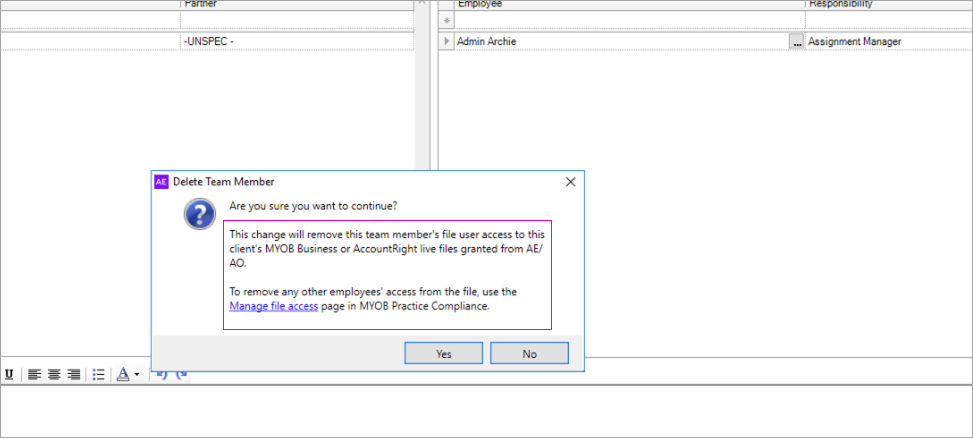
|
We’ll update the message in the window to show that the file access will not be removed when an employee is removed from the Client’s Responsibility tab when the Team security is turned off. |
|
In Trust and Partnership returns deductions entered at Item 18 incorrectly increase Assessable Government Industry Payments in Business Schedule C (Primary Production) |
This caused Gross income/loss from primary production to increase incorrectly and integrated amounts at Item 5: Label E, Label G and Total business income. |
As a workaround, review the totals ant Item 5, prior to lodging and enter the amounts manually. |